
Nextjs身份验证
1.安装NextAuth.js
bash
pnpm i next-auth@beta2. 生成密钥
bash
openssl rand -base64 32电脑没有安装openssl也可以使用在线工具或者自己生成随机数。
将密钥添加到.env中的AUTH_SECRET。
在Vercel 上添加密钥
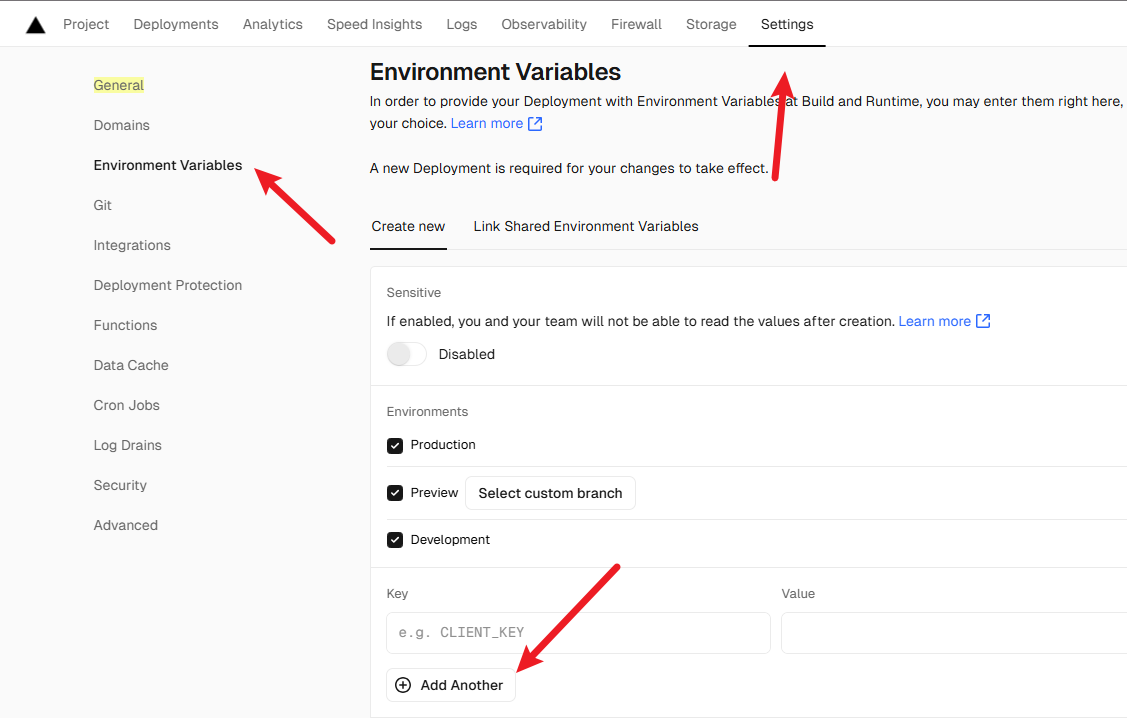
3.在根目录创建auth.config.ts
ts
import type { NextAuthConfig } from 'next-auth';

export const authConfig = {
    pages: {
        signIn: '/login',
    },
    callbacks: {
        authorized({ auth, request: { nextUrl } }) {
            const isLoggedIn = !!auth?.user;
            const isOnDashboard = nextUrl.pathname.startsWith('/dashboard');
            if (isOnDashboard) {
                if (isLoggedIn) return true;
                return false; // Redirect unauthenticated users to login page
            } else if (isLoggedIn) {
                return Response.redirect(new URL('/dashboard', nextUrl));
            }
            return true;
        },
    },
    providers: []
} satisfies NextAuthConfig;4.在根目录创建middleware.ts
ts
import NextAuth from 'next-auth';
import { authConfig } from './auth.config';

export default NextAuth(authConfig).auth;

export const config = {
  // https://nextjs.org/docs/app/building-your-application/routing/middleware#matcher
  matcher: ['/((?!api|_next/static|_next/image|.*\\.png$).*)'],
};
5.新建auth.ts文件
ts
import NextAuth from 'next-auth';
import Credentials from 'next-auth/providers/credentials';
import { authConfig } from './auth.config';
import { z } from 'zod';
import { sql } from '@vercel/postgres';
import type { User } from '@/app/lib/definitions';
import bcrypt from 'bcrypt';

async function getUser(email: string): Promise<User | undefined> {
  try {
    const user = await sql<User>`SELECT * FROM users WHERE email=${email}`;
    return user.rows[0];
  } catch (error) {
    console.error('Failed to fetch user:', error);
    throw new Error('Failed to fetch user.');
  }
}

export const { auth, signIn, signOut } = NextAuth({
  ...authConfig,
  providers: [
    Credentials({
      async authorize(credentials) {
        const parsedCredentials = z
          .object({ email: z.string().email(), password: z.string().min(6) })
          .safeParse(credentials);

        if (parsedCredentials.success) {
          const { email, password } = parsedCredentials.data;
          const user = await getUser(email);
          if (!user) return null;
          const passwordsMatch = await bcrypt.compare(password, user.password);
          if (passwordsMatch) return user;
        }
        console.log('Invalid credentials');
        return null;
      },
    }),
  ],
});
6.将身份验证逻辑与登录表单连接起来
ts
// /app/lib/actions.ts
'use server';

import { signIn } from '@/auth';
import { AuthError } from 'next-auth';

// ...

export async function authenticate(
  prevState: string | undefined,
  formData: FormData,
) {
  try {
    await signIn('credentials', formData);
  } catch (error) {
    if (error instanceof AuthError) {
      switch (error.type) {
        case 'CredentialsSignin':
          return 'Invalid credentials.';
        default:
          return 'Something went wrong.';
      }
    }
    throw error;
  }
}
7.表单文件
tsx
// app/ui/login-form.tsx
"use client";
import { lusitana } from "@/app/ui/fonts";
import {
  AtSymbolIcon,
  KeyIcon,
  ExclamationCircleIcon,
} from "@heroicons/react/24/outline";
import { ArrowRightIcon } from "@heroicons/react/20/solid";
import { Button } from "./button";
import { useActionState } from "react";
import { authenticate } from "../lib/actions";

export default function LoginForm() {
  const [errorMessage, formAction, isPending] = useActionState(
    authenticate,
    undefined
  );
  return (
    <form action={formAction} className="space-y-3">
      <div className="flex-1 rounded-lg bg-gray-50 px-6 pb-4 pt-8">
        <h1 className={`${lusitana.className} mb-3 text-2xl`}>
          Please log in to continue.
        </h1>
        <div className="w-full">
          <div>
            <label
              className="mb-3 mt-5 block text-xs font-medium text-gray-900"
              htmlFor="email"
            >
              Email
            </label>
            <div className="relative">
              <input
                className="peer block w-full rounded-md border border-gray-200 py-[9px] pl-10 text-sm outline-2 placeholder:text-gray-500"
                id="email"
                type="email"
                name="email"
                placeholder="Enter your email address"
                required
              />
              <AtSymbolIcon className="pointer-events-none absolute left-3 top-1/2 h-[18px] w-[18px] -translate-y-1/2 text-gray-500 peer-focus:text-gray-900" />
            </div>
          </div>
          <div className="mt-4">
            <label
              className="mb-3 mt-5 block text-xs font-medium text-gray-900"
              htmlFor="password"
            >
              Password
            </label>
            <div className="relative">
              <input
                className="peer block w-full rounded-md border border-gray-200 py-[9px] pl-10 text-sm outline-2 placeholder:text-gray-500"
                id="password"
                type="password"
                name="password"
                placeholder="Enter password"
                required
                minLength={6}
              />
              <KeyIcon className="pointer-events-none absolute left-3 top-1/2 h-[18px] w-[18px] -translate-y-1/2 text-gray-500 peer-focus:text-gray-900" />
            </div>
          </div>
        </div>
        <Button className="mt-4 w-full" aria-disabled={isPending}>
          Log in <ArrowRightIcon className="ml-auto h-5 w-5 text-gray-50" />
        </Button>
        <div className="flex h-8 items-end space-x-1">
          {errorMessage && (
            <>
              <ExclamationCircleIcon className="h-5 w-5 text-red-500" />
              <p className="text-sm text-red-500">{errorMessage}</p>
            </>
          )}
        </div>
      </div>
    </form>
  );
}
8.添加注销功能
tsx
// /ui/dashboard/sidenav.tsx
import Link from 'next/link';
import NavLinks from '@/app/ui/dashboard/nav-links';
import AcmeLogo from '@/app/ui/acme-logo';
import { PowerIcon } from '@heroicons/react/24/outline';
import { signOut } from '@/auth';

export default function SideNav() {
  return (
    <div className="flex h-full flex-col px-3 py-4 md:px-2">
      // ...
      <div className="flex grow flex-row justify-between space-x-2 md:flex-col md:space-x-0 md:space-y-2">
        <NavLinks />
        <div className="hidden h-auto w-full grow rounded-md bg-gray-50 md:block"></div>
        <form
          action={async () => {
            'use server';
            await signOut();
          }}
        >
          <button className="flex h-[48px] grow items-center justify-center gap-2 rounded-md bg-gray-50 p-3 text-sm font-medium hover:bg-sky-100 hover:text-blue-600 md:flex-none md:justify-start md:p-2 md:px-3">
            <PowerIcon className="w-6" />
            <div className="hidden md:block">Sign Out</div>
          </button>
        </form>
      </div>
    </div>
  );
}