
Prisma 基础入门
Prisma 是一个现代化的数据库工具,通常用于与 JavaScript/TypeScript 项目集成。它能大幅简化数据库操作,特别是在构建全栈应用时。以下是 Prisma 的主要功能和优势:
- 主要功能
- ORM:提供类型安全的数据库查询,同时支持复杂的关系查询。
- Schema 管理:通过 Prisma Schema 定义数据库模型,可以自动生成数据库迁移。
- 代码生成:自动生成类型化的数据库客户端,支持更快的开发和减少错误。
- 多数据库支持:支持多种数据库,如 PostgreSQL、MySQL、SQLite、MongoDB 和 Microsoft SQL Server。
- 核心组件
- Prisma Client:用于在应用中执行数据库查询,类型安全且支持自动补全。
- Prisma Migrate:管理数据库模式的迁移工具。
- Prisma Studio:一个直观的 Web 界面,用于浏览和操作数据库数据。
- 使用场景
- 构建全栈应用(如使用 Next.js)。
- 替代传统 ORM 工具(如 Sequelize 或 TypeORM)。
- 在 TypeScript 项目中进行安全且高效的数据库操作。
创建项目
- 创建一个空文件夹
npm init -y
npm install prisma typescript tsx @types/node --save-dev
初始化 TypeScript
bashnpx tsc --init npx tsc -- 初始化这条命令会完成两个操作:
- 创建一个名为
prisma的新目录,其中包含一个名为schema.prisma的文件,该文件包含 Prisma 架构以及数据库连接变量和架构模型 - 在项目的根目录中创建
.env文件,该文件用于定义环境变量(例如数据库连接)
- 创建一个名为
初始化 prisma
bashnpx prisma init
连接数据库
首先在schema.prisma文件中可以看到
datasource db {
  provider = "postgresql"
  url      = env("DATABASE_URL")
}provider根据数据库类型进行更改,例:mysql
url则是数据库连接地址,可以在.env 中进行修改
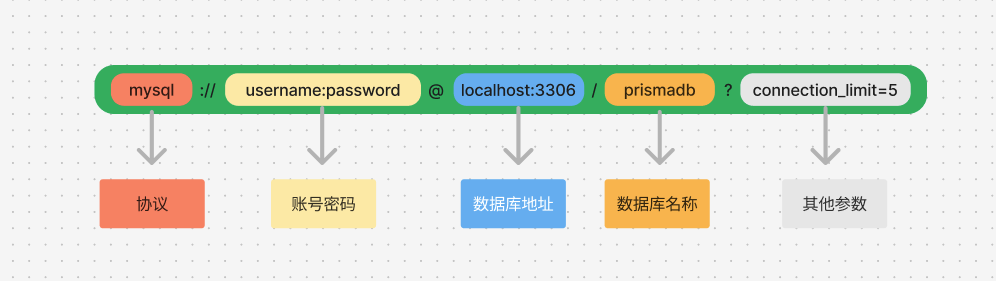
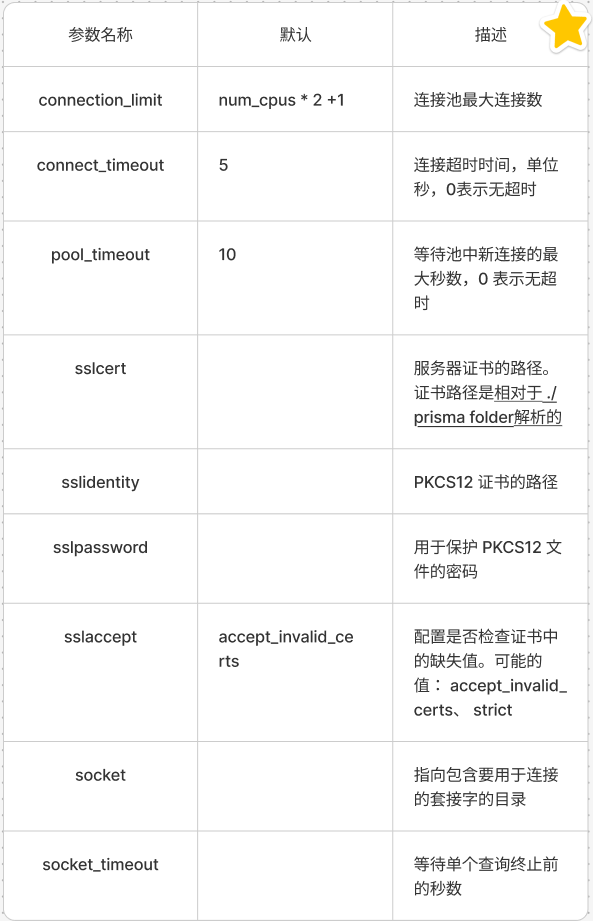
其他参数:
测试是否可以连接成功
npx prisma db pull该命令会尝试连接到数据库,并拉取现有数据库的结构。
如果数据库是空的会返回:
Error:
P4001 The introspected database was empty:
不是空的则会返回:
✔ Your database schema was successfully fetched.两种情况都能说明数据库连接成功。
创建数据库模型
//schema.prisma
model Post {
  id        Int      @id @default(autoincrement())
  createdAt DateTime @default(now())
  updatedAt DateTime @updatedAt
  title     String   @db.VarChar(255)
  content   String?
  published Boolean  @default(false)
  author    User     @relation(fields: [authorId], references: [id])
  authorId  Int
}

model Profile {
  id     Int     @id @default(autoincrement())
  bio    String?
  user   User    @relation(fields: [userId], references: [id])
  userId Int     @unique
}

model User {
  id      Int      @id @default(autoincrement())
  email   String   @unique
  name    String?
  posts   Post[]
  profile Profile?
}执行prisma migrate CLI 命令
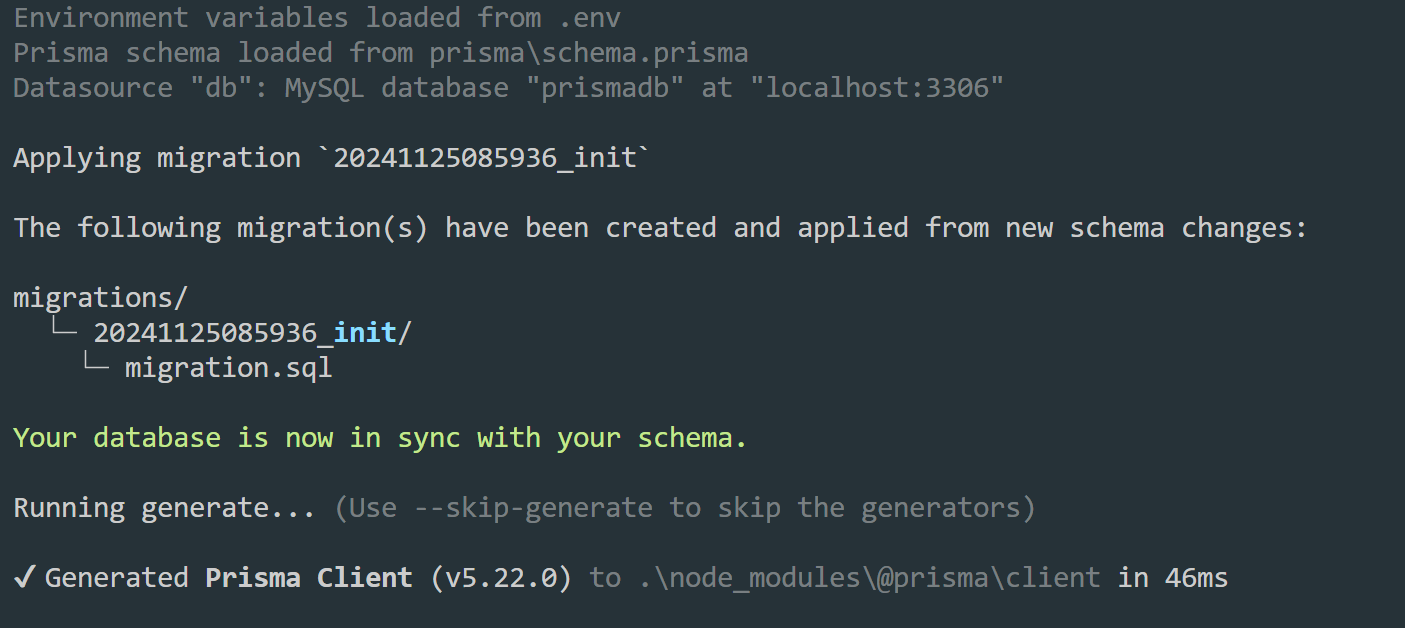
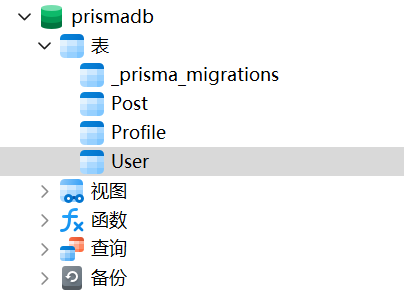
npx prisma migrate dev --name init此命令执行两项操作:
- 它为此次迁移创建一个新的 SQL 迁移文件。
- 它针对数据库运行 SQL 迁移文件。
增删改查操作
在根目录新建index.ts文件,在该目录实现增删改查操作。
新增
//index.ts
import { PrismaClient } from "@prisma/client";

const prisma = new PrismaClient();

async function main() {
  await prisma.user.create({
    data: {
      name: "Alice",
      email: "alice@prisma.io",
      posts: {
        create: { title: "Hello World" },
      },
      profile: {
        create: { bio: "I like turtles" },
      },
    },
  });

  const allUsers = await prisma.user.findMany({
    include: {
      posts: true,
      profile: true,
    },
  });
  console.dir(allUsers, { depth: null });
}
main()
  .then(async () => {
    await prisma.$disconnect();
  })
  .catch(async (e) => {
    console.error(e);
    await prisma.$disconnect();
    process.exit(1);
});使用npx tsx index.ts命令运行
修改
新增edit函数,结尾改为运行edit()函数,其它不做修改
//index.ts
//修改
async function edit() {
  const user = await prisma.user.update({
    where: { id: 1 },
    data: { name: "张三" },
  });
  console.log("====================================");
  console.log(user);
  console.log("====================================");
}
删除
执行删除操作前,在新增一条数据。
// 新增
async function add() {
  await prisma.user.create({
    data: {
      name: "李四",
      email: "lisi@prisma.io",
      posts: {
        create: { title: "Hello World" },
      },
      profile: {
        create: { bio: "I like turtles" },
      },
    },
  });

  const allUsers = await prisma.user.findMany({
    //include 选项传递给 findMany,它告诉 Prisma Client 在返回的 User 对象上包含 posts 和 profile 关系
    include: {
      posts: true,
      profile: true,
    },
  });
  console.dir(allUsers, { depth: null });
}在schema.prisma文件中设置级联删除操作
model Post {
  id        Int      @id @default(autoincrement())
  createdAt DateTime @default(now())
  updatedAt DateTime @updatedAt
  title     String   @db.VarChar(255)
  content   String?
  published Boolean  @default(false)
  author    User     @relation(fields: [authorId], references: [id],onDelete: Cascade)// 配置级联删除
  authorId  Int
}

model Profile {
  id     Int     @id @default(autoincrement())
  bio    String?
  user   User    @relation(fields: [userId], references: [id],onDelete: Cascade)// 配置级联删除
  userId Int     @unique
}
onDelete: Cascade 表示当用户被删除时,关联的所有 Post、Profile 记录也会被删除。
重新应用迁移
npx prisma migrate dev --name add_cascade_delete除了 onDelete: Cascade,Prisma 支持以下几种行为:
| 选项 | 描述 |
|---|---|
Cascade | 删除父记录时,自动删除所有相关子记录。 |
SetNull | 删除父记录时,将子记录中的外键字段设置为 NULL。 |
Restrict (默认) | 如果有子记录引用父记录,则禁止删除父记录,避免违反外键约束。 |
NoAction | 不做任何操作,由数据库决定行为(类似 Restrict,但更灵活)。 |
//index.ts
//删除
async function removeUserById(id: number) {
  await prisma.user.delete({ where: { id } });
}
removeUserById(2)
  .then(async () => {
    await prisma.$disconnect();
  })
  .catch(async (e) => {
    console.error(e);
    await prisma.$disconnect();
    process.exit(1);
  });
查询
查询一下是否已完成删除操作
// 查询
async function findAllUser() {
  const allUsers = await prisma.user.findMany({
    include: {
      profile: true,
      posts: true,
    },
  });
  console.log(allUsers);
}
删除成功,输出结果如下:
[
  {
    id: 1,
    email: 'alice@prisma.io',
    name: '张三',
    profile: { id: 1, bio: 'I like turtles', userId: 1 },
    posts: [ [Object] ]
  }
]
一对多
//一个用户多篇文章
model User {
  id             String @id @default(cuid())
  email          String @unique()
  hashedPassword String
  posts          Post[]
}

model Post {
  id        String   @id @default(cuid())
  title     String
  slug      String   @unique
  content   String
  //?表示该字段是可选的
  published Boolean? @default(false)
  updatedAt DateTime @updatedAt
  createdAt DateTime @default(now())
  author     User    @relation(fields: [authorId], references: [id])
  authorId    String
}
多对多
//多个用户多篇文章
model User {
  id             String @id @default(cuid())
  email          String @unique()
  hashedPassword String
  posts          Post[]
}

model Post {
  id        String   @id @default(cuid())
  title     String
  slug      String   @unique
  content   String
  //?表示该字段是可选的
  published Boolean? @default(false)
  updatedAt DateTime @updatedAt
  createdAt DateTime @default(now())
  author     User[]
}
一对一
//一个用户一篇文章
model User {
  id             String @id @default(cuid())
  email          String @unique()
  hashedPassword String
  posts          Post?
}

model Post {
  id        String   @id @default(cuid())
  title     String
  slug      String   @unique
  content   String
  //?表示该字段是可选的
  published Boolean? @default(false)
  updatedAt DateTime @updatedAt
  createdAt DateTime @default(now())
  author     User    @relation(fields: [authorId], references: [id])
  authorId    String  @unique
}
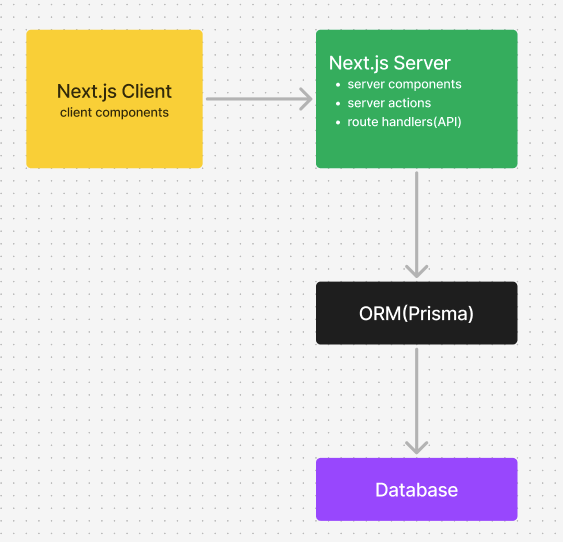
一图搞懂 Prisma 在应用中所处位置
在项目中集成 Prisma
下载依赖
bashnpm i prisma --save-dev初始化
Prismabashnpx prisma init --datasource-provider sqlite在
schema.prisma文件中添加模型tsmodel Post { id String @id @default(cuid()) title String content String //?表示该字段是可选的 published Boolean? @default(false) updatedAt DateTime @updatedAt createdAt DateTime @default(now()) }运行
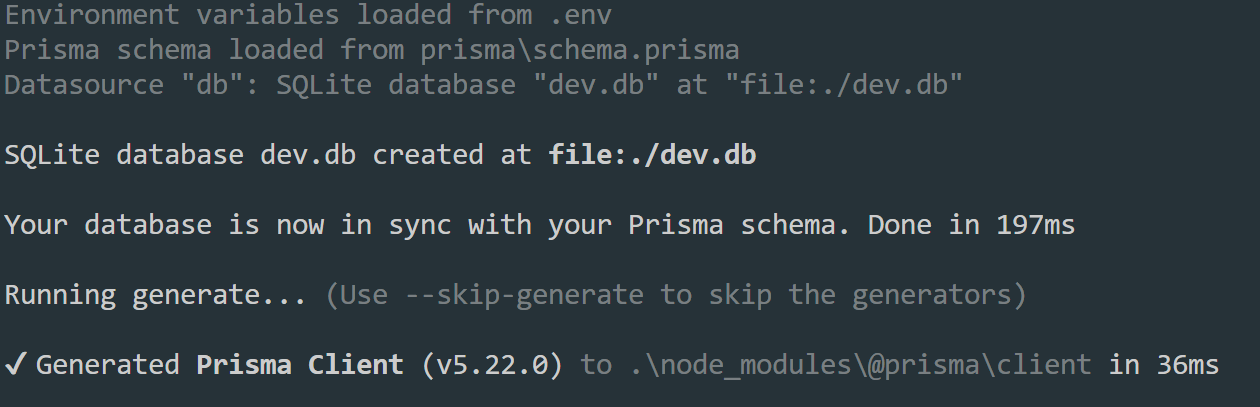
npx prisma db push
同步 Prisma 数据模型:
将
schema.prisma中定义的模型直接推送到数据库。如果数据库中不存在表,会创建表。
如果表已经存在,会根据模型更新表结构(但不会删除已有数据)。
适合场景:
开发阶段快速更新数据库结构。
临时修改数据库结构。
不适合生产环境:
- 它不会生成迁移文件,因此不适合生产环境的数据库管理。
运行
npx prisma studio命令可以打开一个数据库视图,新增一条数据。新建
/lib/db.ts文件tsimport { PrismaClient } from "@prisma/client"; const prismaClientSingleton = () => { return new PrismaClient(); }; declare const globalThis: { prismaGlobal: ReturnType<typeof prismaClientSingleton>; } & typeof global; const prisma = globalThis.prismaGlobal ?? prismaClientSingleton(); export default prisma; if (process.env.NODE_ENV !== "production") globalThis.prismaGlobal = prisma;查询
post所有数据tsximport ThemeToggleButton from "@/components/ThemeToggleButton"; import prisma from "@/lib/db"; import Link from "next/link"; export default async function Home() { const posts = await prisma.post.findMany(); const postsCount = await prisma.post.count(); return ( <div className="w-screen h-screen flex flex-col items-center bg-white dark:bg-black sm:py-5 py-2"> <ThemeToggleButton /> <h1 className="text-blue-400">All POST({postsCount})</h1> {posts.map((item, index) => { return ( <Link href={`/posts/${item.id}`} key={index}> <p className="text-yellow-400">{item.title}</p> </Link> ); })} </div> ); }查询详情
tsximport prisma from "@/lib/db"; const PagesDetail = async ({ params }: { params: { id: string } }) => { const detail = await prisma.post.findUnique({ where: { id: params.id } }); return <div className="">{detail?.content}</div>; }; export default PagesDetail;在数据库文件中添加
slug字段 添加@unique确保该字段的值是唯一的,否则会报错。tsmodel Post { id String @id @default(cuid()) title String slug String @unique content String //?表示该字段是可选的 published Boolean? @default(false) updatedAt DateTime @updatedAt createdAt DateTime @default(now()) }运行
npx prisma db push命令,注意:此命令会导致数据会丢失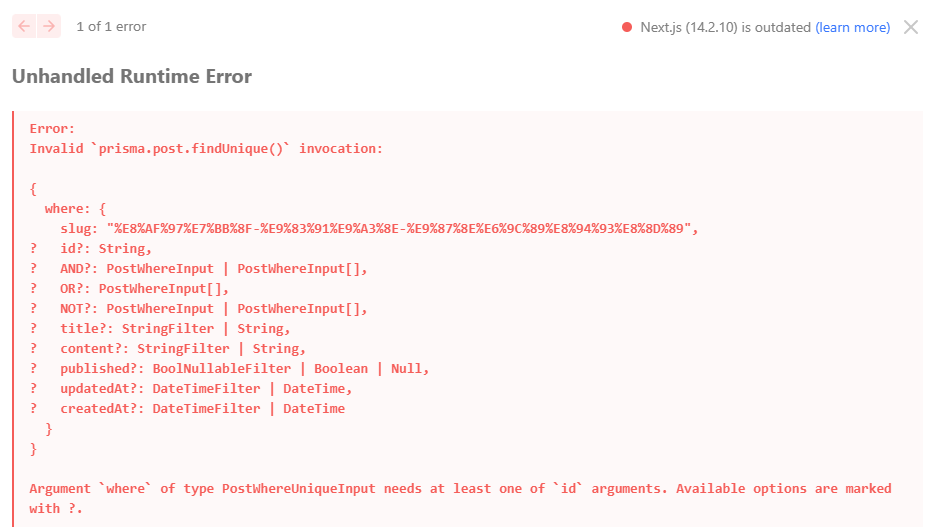
详情页面根据
slug查询详情tsximport prisma from "@/lib/db"; const PagesDetail = async ({ params }: { params: { slug: string } }) => { const detail = await prisma.post.findUnique({ where: { slug: decodeURIComponent(params.slug) }, }); return ( <div className="flex flex-col items-center p-2 sm:p-5"> <div className="text-2xl font-bold">{detail?.title}</div> <div className="text-sm p-5">{detail?.content}</div> </div> ); }; export default PagesDetail;其他一些操作
tsxconst posts = await prisma.post.findMany({ //过滤出已发布的文章 where: { published: true }, //按照创建时间降序 orderBy: { createdAt: "desc", }, //要返回的字段 select: { id: true, slug: true, title: true, }, take: 2, // 获取前 2 条记录 skip: 0, // 从第 0 条开始,不跳过任何记录 });分页:https://www.prisma.io/docs/orm/prisma-client/queries/pagination
添加文章
tsximport { createPost } from "../action/action"; const addPost = () => { return ( <div className="flex flex-col items-center pt-10"> <span className="text-2xl font-bold">添加</span> <form action={createPost} className="flex flex-col gap-5 py-5"> <input type="text" name="title" placeholder="Title" className="px-2 py-1 rounded-sm border" /> <textarea name="content" rows={5} placeholder="Conent" className="px-2 py-1 rounded-sm border" /> <button type="submit" className="bg-blue-500 py-2 text-white rounded-sm" > 提交 </button> </form> </div> ); }; export default addPost;编辑文章
tsx删除文章
tsx// remmoveBtn "use client"; import { IoIosCloseCircle } from "react-icons/io"; import { deletePost } from "@/app/action/action"; const RemoveBtn = ({ id }: { id: string }) => { const handleRemove = async () => { await deletePost(id); }; return ( <IoIosCloseCircle onClick={handleRemove} className="text-[#C20E4D] cursor-pointer" /> ); }; export default RemoveBtn;action文件ts//action/action.ts "use server"; import prisma from "@/lib/db"; import { revalidatePath } from "next/cache"; import { redirect } from "next/navigation"; export async function createPost(formData: FormData) { await prisma.post.create({ data: { title: formData.get("title") as string, content: formData.get("content") as string, slug: formData.get("title") as string, }, }); revalidatePath("/"); redirect("/"); } export async function editPost(formData: FormData, id: string) { await prisma.post.update({ where: { id }, data: { title: formData.get("title") as string, content: formData.get("content") as string, slug: formData.get("title") as string, }, }); revalidatePath("/"); redirect("/"); } export async function deletePost(id: string) { await prisma.post.delete({ where: { id } }); revalidatePath("/"); }一对多关系
tsmodel User { id String @id @default(cuid()) email String @unique() hashedPassword String posts Post[] } model Post { id String @id @default(cuid()) title String slug String @unique content String //?表示该字段是可选的 published Boolean? @default(false) updatedAt DateTime @updatedAt createdAt DateTime @default(now()) author User @relation(fields: [authorId], references: [id]) authorId String }更新数据库
npx prisma db push添加一条试试
tsexport async function createPost(formData: FormData) { await prisma.post.create({ data: { title: formData.get("title") as string, content: formData.get("content") as string, slug: formData.get("title") as string, author: { connect: { email: "1404340013@qq.com", }, }, }, }); revalidatePath("/"); redirect("/"); }初始化数据
ts// /prisma/seed.ts import { Prisma, PrismaClient } from "@prisma/client"; const prisma = new PrismaClient(); const initialPosts: Prisma.PostCreateInput[] = [ { title: "post 1", slug: "post-1", content: "个人皇家公馆热加工戈培尔工卡让娃", author: { connectOrCreate: { where: { email: "18839362311@163.com", }, create: { email: "18839362311@163.com", hashedPassword: "flefhjkhfjkhjjk", }, }, }, }, ]; async function main() { console.log("start seeding..."); for (const post of initialPosts) { const newPost = await prisma.post.create({ data: post, }); console.log(`"new postid"${newPost.id}`); } console.log("seeding finish"); } main() .then(async () => { await prisma.$disconnect(); }) .catch(async (e) => { console.error(e); await prisma.$disconnect(); process.exit(1); });在
package.json中添加命令行js"prisma": { "seed": "ts-node --compiler-options {\"module\":\"CommonJS\"} prisma/seed.ts" },下载依赖
npm i ts-node -D执行
npx prisma db seed命令捕获错误信息
tsexport async function createPost(formData: FormData) { try { await prisma.post.create({ data: { title: formData.get("title") as string, content: formData.get("content") as string, slug: formData.get("title") as string, author: { connect: { email: "18839362311@163.com", }, }, }, }); } catch (error) { if (error instanceof Prisma.PrismaClientKnownRequestError) // console.log(error); switch (error.code) { case "P2002": console.log("Unique constraint failed on the {constraint}"); break; default: break; } console.log("出错啦"); } revalidatePath("/"); redirect("/"); }其它错误码文档
https://www.prisma.io/docs/orm/reference/error-reference#p1012
数据库迁移
npx prisma migrate dev