
Threejs
1.引入
1.1开发环境引入
js
npm i three@版本号 --savejs
import * as THREE from 'three'1.2引入拓展库
除了three.js核心库以外,在threejs文件包中examples/jsm目录下有各种不同功能的扩展库。
js
// 引入扩展库OrbitControls.js
import { OrbitControls } from 'three/addons/controls/OrbitControls.js';
// 引入扩展库GLTFLoader.js
import { GLTFLoader } from 'three/addons/loaders/GLTFLoader.js';
js
// 扩展库引入——旧版本,比如122, 新版本路径addons替换了examples/jsm
import { OrbitControls } from 'three/examples/jsm/controls/OrbitControls.js';
1.2学习环境引入
1.2.1 script标签引入
js
<script src="./build/three.js"></script>1.2.2 ES6 import方式引入
js
    <script type="module">
        // 现在浏览器支持ES6语法,自然包括import方式引入js文件
        import * as THREE from './build/three.module.js';
    </script>
1.2.3 type='importmap'配置路径后引入
js
   <!-- 具体路径配置,你根据自己文件目录设置 -->
    <script type="importmap">
        {
            "imports": {
                "three": "../../../three.js/build/three.module.js",
                //拓展库引入
                 "three/addons/": "./three.js/examples/jsm/"
            }
        }
    </script>
js
    <!-- 配置type="importmap",.html文件也能和项目开发环境一样方式引入threejs -->
    <script type="module">
        import * as THREE from 'three';
        // 浏览器控制台测试,是否引入成功
        console.log(THREE.Scene);
    </script>
2. 基本概念
认识场景Scene、相机Camera、渲染器Renderer三个基本概念。 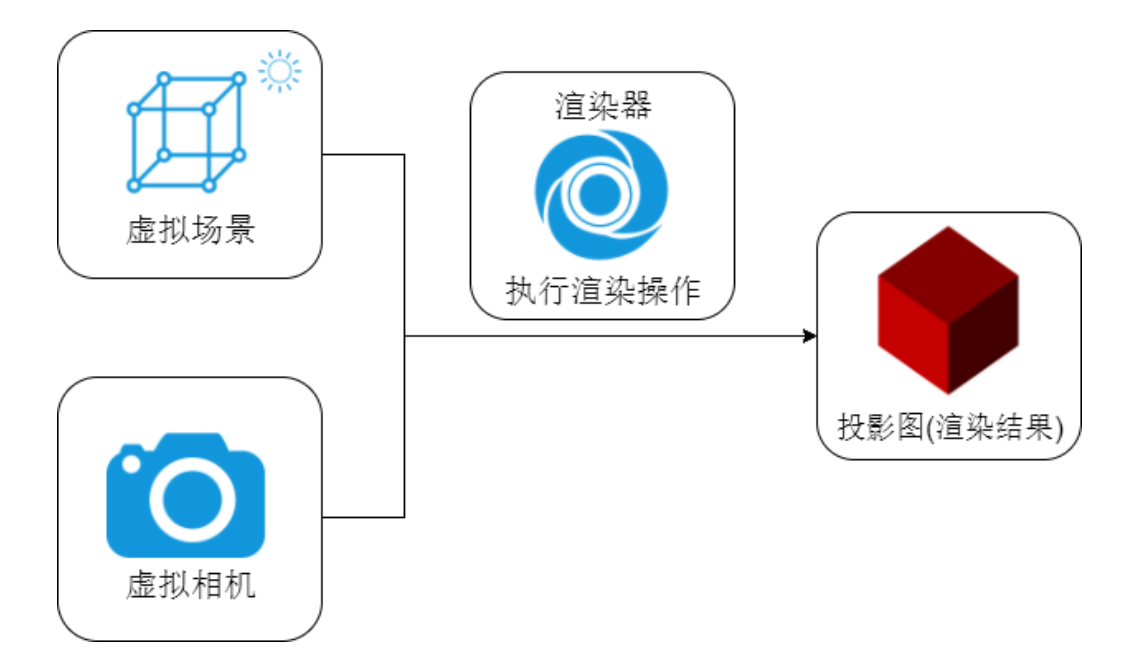
2.1 场景Scene
场景是所有物体、光源、辅助器等对象的容器,相当于一个空间,所有物体、光源、辅助器等对象都需要添加到场景中,才能进行渲染。
js
const scene = new THREE.Scene();几何体
| 几何体 | 说明 |
|---|---|
| 长方体 | BoxGeometry |
| 圆柱体 | CylinderGeometry |
| 球体 | SphereGeometry |
| 圆锥 | ConeGeometry |
| 矩形平面 | PlaneGeometry |
| 圆平面 | CircleGeometry |
文档搜索关键词geometry你可以看到threejs提供各种几何体相关API
2.2 相机Camera
相机决定了渲染什么以及如何渲染,场景中的物体只有被相机看到才会被渲染到页面上。Threejs中有多种相机,这里我们使用透视相机PerspectiveCamera。
js
const camera = new THREE.PerspectiveCamera(75, window.innerWidth / window.innerHeight, 0.1, 1000);